
Most of what slows a sales team down is not selling — it is the connective tissue between selling. Someone has to assign the new lead, remember to follow up in three days, send the same intro email for the hundredth time, update a field, and tell the manager a big deal just moved. None of it is hard; all of it is forgettable; and every dropped step is a small leak in your pipeline.
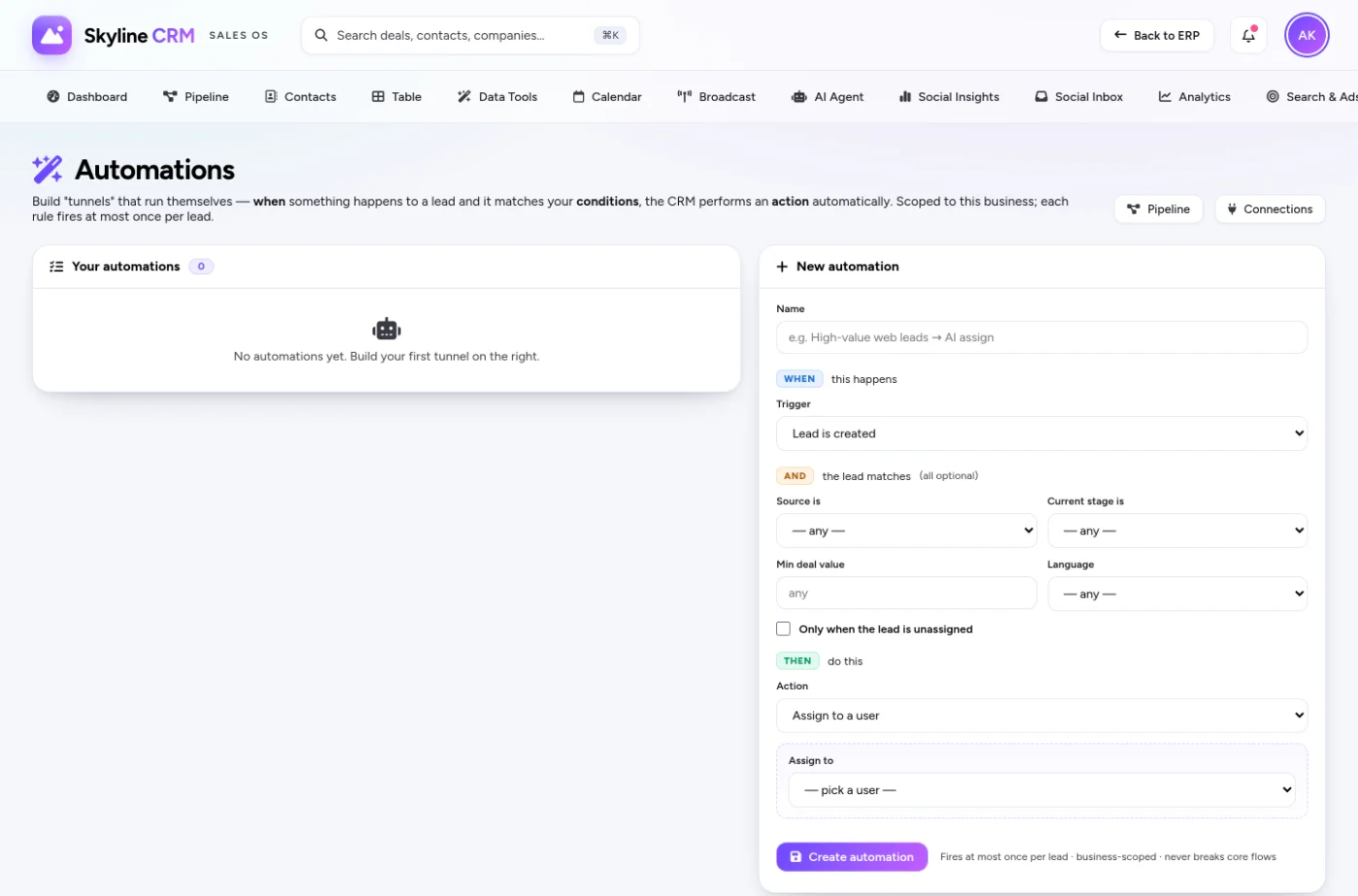
No-code automations in Skyline Sales OS — called tunnels — close those leaks. A tunnel is a rule you build in plain language, with no developer and no script: WHEN something happens, IF certain conditions hold, THEN do something. You assemble it from menus, save it, and from then on the system does that work every time, instantly and without forgetting.
The three parts of a tunnel
WHEN — the trigger. The event that starts the tunnel: a new lead arrives, a deal changes stage, a quote is accepted, a field is updated, a follow-up falls due.
IF — the conditions. Optional filters that decide whether to proceed: only if the lead's source is WhatsApp, only if the deal value is above a threshold, only if it belongs to a certain territory. Conditions are how one tunnel handles many cases without firing on everything.
THEN — the action. What actually happens. Skyline Sales OS gives you a practical set of actions out of the box:
- Assign the lead to a specific rep, or AI-assign it to the best-fit rep by workload and recent wins
- Move the deal to another stage
- Create a follow-up task, dated and owned
- Send a templated email to the contact
- Set a field to a value
- Notify a teammate
Tunnels worth building on day one
The fastest wins are the rules every team needs but no team remembers to do by hand:
- WHEN a new lead arrives → THEN AI-assign it and create a "first contact" follow-up for today. No lead waits, every lead has an owner and a next step.
- WHEN a deal moves to Negotiation → IF value is above your big-deal threshold → THEN notify the sales manager. Leadership sees the deals that matter without asking.
- WHEN a quote is accepted → THEN move the deal to Won and send a thank-you email. The close finishes itself.
- WHEN a lead's source is a web form → THEN send the templated intro email immediately. Speed-to-lead without a human in the loop.
| Part | Question it answers | Examples |
|---|---|---|
| WHEN | What starts this? | New lead, stage change, quote accepted, follow-up due |
| IF | Should it run this time? | Source, value, territory, owner |
| THEN | What happens? | Assign / AI-assign, move stage, follow-up, email, set field, notify |
Why "no-code" actually matters here
The phrase gets overused, so here is the concrete benefit: the person who knows the process — your sales manager — builds the automation themselves, in minutes, without filing a request to IT and waiting a week. When your process changes, you change the tunnel. That short feedback loop is the whole value: your automation keeps pace with how you actually sell, instead of freezing the way things worked the day a developer set it up.
Tunnels also compose with the rest of Skyline Sales OS. The same AI that powers lead scoring and auto-assign is an action you can drop into any tunnel, and stage moves on the pipeline board are triggers you can build on. You are not learning a separate automation product — you are wiring together tools you already use.
A Saudi example: the after-hours lead
A trading company in Dammam gets enquiries at all hours, and a lead that lands at 11pm on a Thursday used to sit until Sunday — by which point a competitor had already called. One tunnel fixes it: WHEN a lead arrives IF outside business hours THEN send a polite Arabic acknowledgement email and AI-assign it so it is first on someone's list at the start of the next working day. The customer feels seen instantly, and the rep starts Sunday already pointed at the right deal.
Start small, then grow
A word of caution worth its weight: the temptation with a no-code builder is to automate everything at once. Resist it. Start with two or three tunnels that remove your most repeated manual steps — assign-and-follow-up on new leads is almost always the first — live with them for a week, and only then add more. Automation you understand and trust beats a tangle of rules nobody remembers building. Because tunnels are so quick to edit, growing your automation gradually costs you nothing and keeps every rule earning its place.
Frequently asked questions
Do I need a developer to build a tunnel?
No. Tunnels are built from menus in plain language. The person who owns the process builds them.
Can a tunnel use AI?
Yes. AI-assign is a built-in action, so you can route leads intelligently as part of any rule.
Can conditions stop a tunnel from over-firing?
That is exactly what the IF step is for. Add conditions so a tunnel only acts on the cases you intend.
What happens if I change my process later?
You edit the tunnel. Because there is no code, changes take minutes and keep your automation matching reality.
Map your busywork, then automate it
Bring the three or four manual steps your team repeats every day, and we will turn them into tunnels live so you can see the time they give back. To set up a working session, request a Skyline Sales OS demo.
Comments
0 total · 0 threads