

Ask a sales manager where a particular deal stands and, in too many companies, the honest answer is "let me check with the rep." The status lives in someone's head, or in a spreadsheet column last touched a week ago. A visual pipeline board fixes that by making the state of every deal something you can see, not something you have to ask about.
Skyline Sales OS uses a Monday-style board: stages are columns, deals are cards, and the work moves left to right as you close. It is deliberately simple to look at and quick to use, because a pipeline only stays accurate if updating it takes seconds.
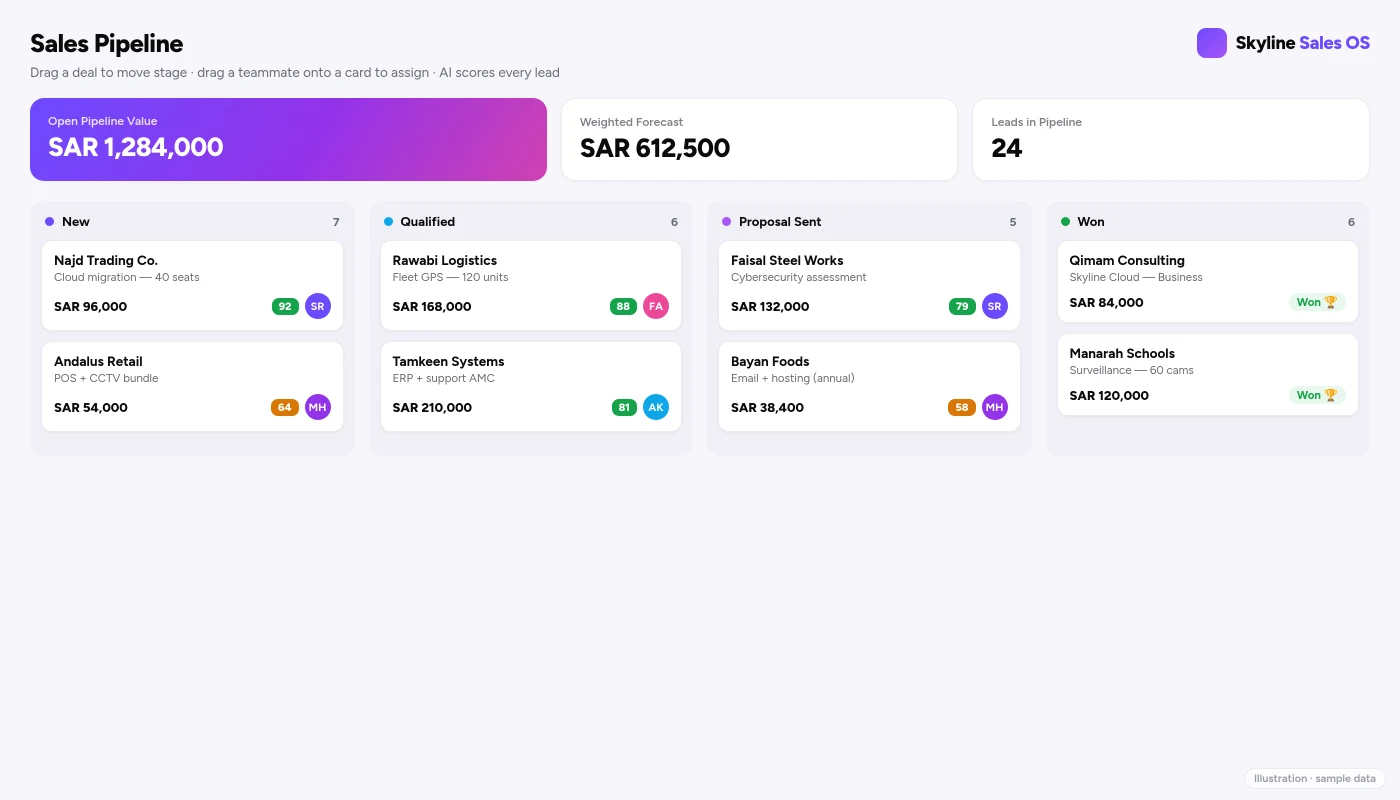
Stages as columns, deals as cards
Each column is a stage in your sales process — for example New, Qualified, Quoted, Negotiation, Won, Lost — and you can shape those stages to match how your team actually sells. Every deal is a card in the column it has reached. The whole board is one screen, so a manager reads the shape of the business in a glance: a fat New column with a thin Negotiation column tells a very different story from the reverse.
Drag to move a deal forward
Moving a deal is a drag, not a form. When a customer accepts a proposal, you drag the card from Quoted into Negotiation; when it closes, you drag it into Won. Because the gesture is so light, reps actually do it, which is the whole point — a board nobody updates is worse than no board at all. Each move can also trigger your automations, so advancing a stage can create a follow-up or notify a manager without any extra clicks.
Deal value, right on the card
The amount sits on the face of the card, so you never open a deal just to remember how big it is. Sum a column in your head and you have the rough weight of that stage; the system does the precise version for you in analytics and the weighted forecast. Pair the inline value with the AI win-probability and a card tells you both how much and how likely at a glance.
Assign by dragging a photo
Ownership is visual too. To hand a deal to a colleague, you drag their profile photo onto the card — no dropdown, no "assigned to" field to hunt for. The faces on the board show who owns what, so load is obvious: if one rep's photo is on half the cards, you can rebalance on the spot. Prefer the system to decide? AI auto-assign can route new leads for you; see AI lead scoring and auto-assign.
The flame badge: catching rotting deals
The most expensive deals are the ones that quietly stop moving. Skyline Sales OS marks a deal that has sat untouched too long with a flame badge — the rotting flag. It is a visual smoke alarm: a card you should either push forward or honestly mark Lost. For Saudi B2B cycles that run for weeks across Ramadan, summer travel and procurement committees, this is the difference between a pipeline that reflects reality and one quietly inflated by deals that died months ago.
| Board element | What you see | Why it helps |
|---|---|---|
| Stage columns | Where each deal is | Read the business in one glance |
| Deal card | Value + owner photo | Size and ownership without clicking |
| Drag-to-move | Cards slide between stages | Updates take seconds, so they happen |
| Drag-photo assign | Faces on cards | Workload is obvious and rebalanced fast |
| Flame badge | Rotting-deal flag | Stale deals surface before they rot |
| Won / Lost | Closing columns | Honest outcomes, clean reporting |
Why visual beats the spreadsheet
A spreadsheet can hold the same data, but it cannot show it. Status is a value in a cell, not a position you can see; ownership is a name typed in, not a face; a stalling deal looks identical to a healthy one. The board turns your pipeline into a shared picture the whole team reads the same way — in your morning stand-up, nobody narrates the spreadsheet, they point at the board. And because Won and Lost are real columns, your historical data stays clean enough to trust in forecasting.
A board that stays trustworthy
A pipeline is only as useful as it is honest, and a visual board makes honesty easy to enforce. Keep one card per real opportunity rather than splitting a single deal into several optimistic ones; move a dead deal into Lost the day you know, instead of letting it linger and inflate the column; and let the flame badge do its job rather than quietly clearing it. A board the whole team trusts at a glance is worth more than a tidy spreadsheet nobody believes — and it is the foundation every other number in Skyline Sales OS is built on.
Frequently asked questions
Can I customise the stages?
Yes. Shape the columns to match your real sales process rather than bending your process to fit the tool.
Does moving a card do anything beyond change its stage?
It can. Tie stage changes to automations so a move creates follow-ups, sends a templated email, or notifies a teammate.
How does the board know a deal is rotting?
A deal that has not progressed within your expected window is flagged with the flame badge so it cannot hide at the bottom of a column.
Does it work on a phone?
Yes. Skyline Sales OS installs as a mobile app (PWA), so reps drag deals on the same board from the field. See the Saudi-ready mobile CRM.
See your own deals on the board
Load a slice of your real pipeline and watch how much clearer it becomes when every deal is a card you can move, weigh and assign by sight. To get a walkthrough on your own stages, request a Skyline Sales OS demo.
Comments
0 total · 0 threads