
Every Saudi boardroom now has "AI" on the agenda, and Vision 2030 has turned the question from whether to adopt it into how fast. Yet most of the software a business runs day to day — the ERP, the POS, the accounting package, the ticketing inbox — was built before this wave and ships with zero intelligence. The opportunity is not to rip it all out and start again. It is to layer AI onto the systems you already trust.
This guide is the practical version of that journey, written for operators in Riyadh, Jeddah, Dammam and across the Kingdom who want results rather than slideware.
Start with a job to be done, not a model
The most common failure we see is teams falling in love with a model and then hunting for a problem. Reverse it. Pick one expensive, repetitive, high-volume task — quoting, first-line support, invoice data entry, lead triage — and ask what "good" looks like with a number attached. "Cut quote turnaround from two days to two hours" is a brief an engineer can build against. "Add AI" is not.
Score your candidate tasks on three axes: volume (how often it happens), pain (cost of getting it wrong), and data availability (do you already have the examples a model needs). The winner is your first project.
A map of where AI actually fits
Once you have a target, it helps to see the whole landscape. AI rarely replaces a system; it sits beside it and connects in.
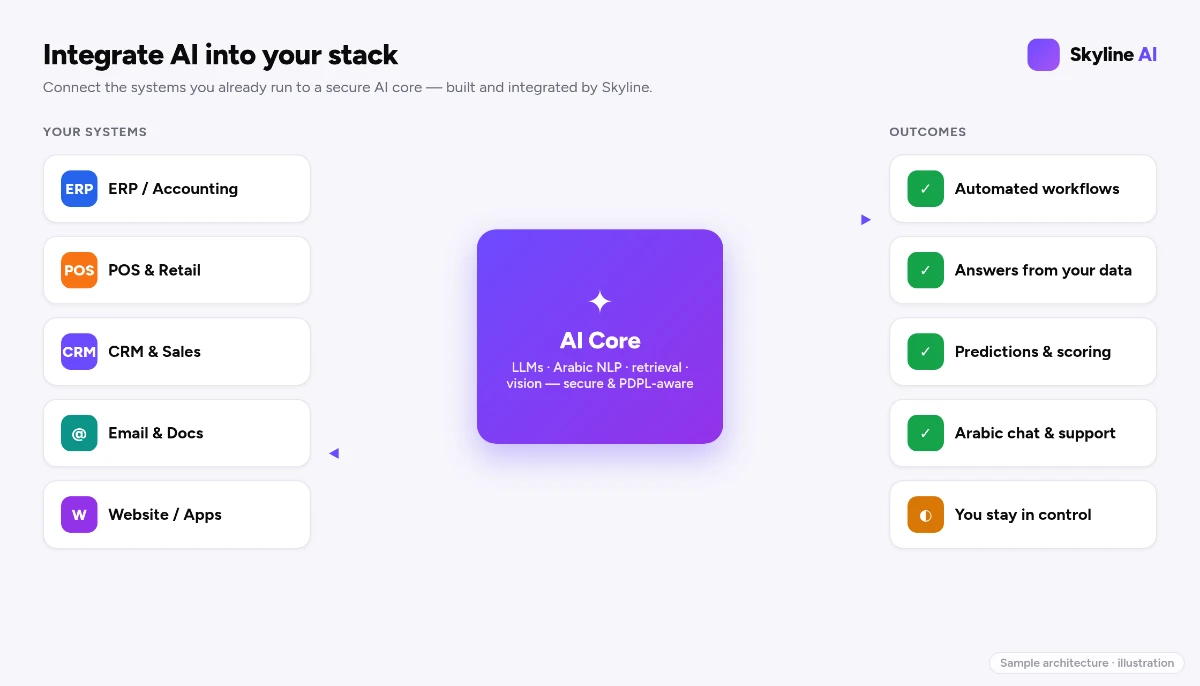
There are five integration patterns that cover the vast majority of real projects:
- Conversational layer — a chatbot or assistant in front of your website, app or WhatsApp that understands Arabic and English. See building an Arabic-first AI chatbot.
- Retrieval (RAG) — an assistant that answers strictly from your documents — policies, manuals, contracts — instead of guessing. See the RAG knowledge assistant explained.
- Autonomous agents — software that takes multi-step actions on your behalf inside guardrails. See custom AI agents for business.
- Document & vision AI — reading invoices, IDs, forms and camera feeds. See computer-vision business use cases.
- Predictive analytics — forecasting demand, churn, or which lead will convert.
Most ambitious projects combine two or three of these.
Build, buy, or wire together
Not every AI need is a custom build. An off-the-shelf tool may cover 80% of a generic task for a fixed monthly fee. The trouble starts when your workflow, your Arabic content, or your data-residency rules sit in the other 20%. We walk through the honest tradeoffs in LLM integration: build vs buy. The short version: buy the commodity, build the differentiator, and use APIs to wire leading large language models into both.
Keep a human in control
AI that drafts is safe; AI that acts unsupervised on money, contracts or customers is not — yet. Generative models can produce fluent, confident answers that are simply wrong (an effect called hallucination). The fix is not to avoid the technology; it is to design for review. Every system Skyline builds keeps a human in the loop on consequential actions: the AI proposes, a person approves, and the audit trail records both. Read the honest limits in generative AI for business.
Residency and PDPL, by design
For Saudi organisations, where the data and the model run is a board-level question. Personal data carried into a model, prompts that contain customer records, and the logs a vendor keeps are all governed by the Personal Data Protection Law (PDPL). We design integrations to keep regulated data in-Kingdom — on Skyline Cloud or inside your own environment — and to minimise what ever leaves your control. This is a positioning and engineering stance, not a certificate; the detail is in AI, PDPL and data residency in Saudi Arabia.
A 90-day rollout that ships
- Days 1–15 — Discover. Pick the one task, define the success metric, gather sample data, agree the residency boundary.
- Days 16–45 — Prototype. Build a narrow version that does one thing well. Test it on real historical cases. Measure against the metric.
- Days 46–75 — Pilot. Put it in front of a small, willing team. Keep humans approving outputs. Collect corrections — they are training gold.
- Days 76–90 — Harden and integrate. Wire it into the live system via API, add monitoring, document the guardrails, and plan the next task.
The teams that win treat AI as a product line, not a one-off project — each shipped use case funds and de-risks the next.
Proof: Skyline runs this on itself
We are not describing theory. Skyline runs live AI inside its own products: an AI CRM (Skyline Sales OS) that scores and routes leads, an AI IT-support assistant that drafts knowledge-grounded replies, and email-automation desks that read inbound business mail and draft answers for staff to approve. We built the patterns above on our own operation first, then for customers — on Skyline Cloud or in your environment.
Frequently asked questions
Do I have to replace my existing software to add AI?
No. The large majority of projects integrate AI as a layer on top of the systems you already run, connected through APIs. You keep your proven tools and add intelligence only where it pays.
How long before I see real results?
A single, well-scoped use case typically reaches a working pilot in about 90 days, as the rollout above lays out. The point is to ship one valuable thing, prove it, then fund the next.
Is my data safe if the AI runs in Saudi Arabia?
We design integrations to keep regulated data in-Kingdom and to minimise what leaves your control. This is an engineering and positioning stance — your own legal and compliance review remains the final authority.
Can it work in both Arabic and English?
Yes. Skyline is Arabic-first by default across interface, content and support, and every assistant we build is bilingual.
Book your next step
If you have a candidate task in mind, the fastest path is a conversation. Book a free AI consultation and we will pressure-test one idea with you, sketch the integration, and tell you honestly whether to build, buy, or wait. Explore the full Skyline AI Integration service to see the capabilities behind this guide.
Comments
0 total · 0 threads