Use the language menu in the top bar of the console, which shows English or العربية, and pick the other language; Arabic is laid out right to left. The same choice is in Settings → Language and region: select Change next to Language. On that page you also set the Time zone and the Appearance (Light, Dark or Same as device). The choice is yours alone.
What you need
- A Skyline Cloud sign-in. No special role is needed: these are personal preferences.
How do I change the language of the console?
Use the top bar. At the top of any page select the language menu (it shows English or العربية) and choose the other language.
Or use Settings. Open Settings → Language and region. Under Your preferences select Change next to Language and choose English (left to right) or العربية (right to left).
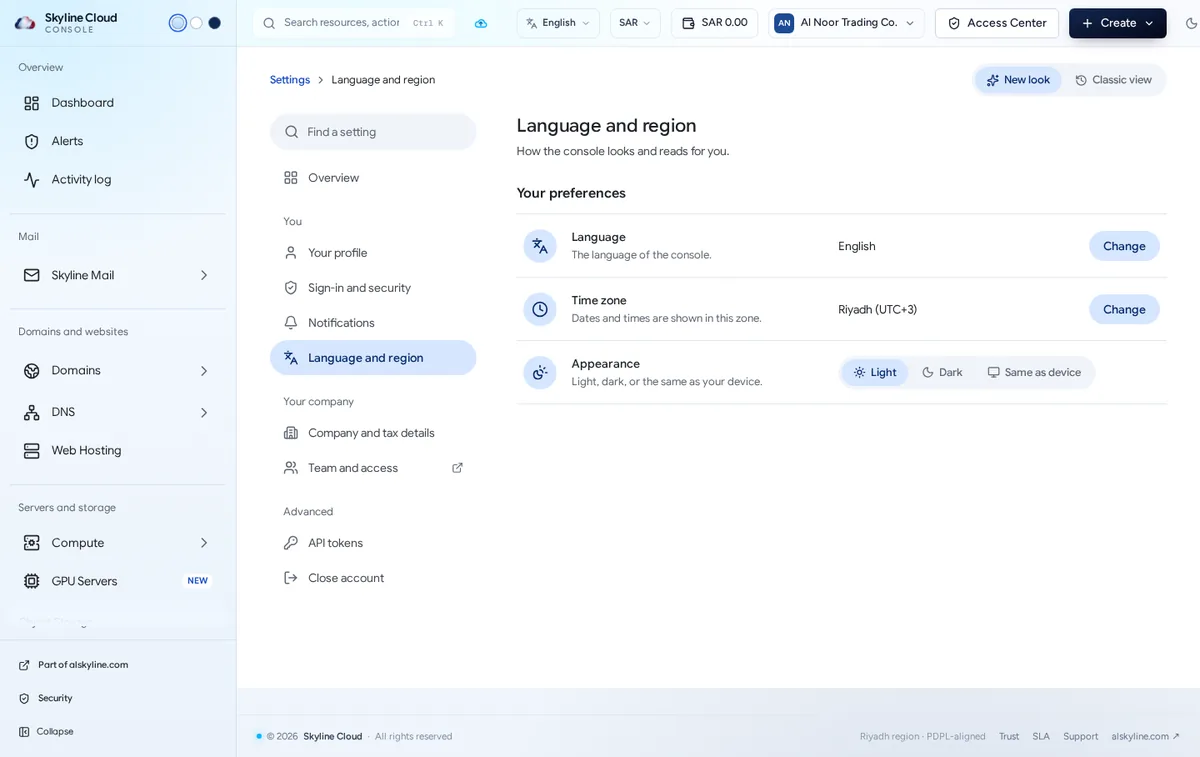
Set the time zone. Select Change next to Time zone. Dates and times, for example in Settings and in the Mail log, are shown in this zone.
Pick the appearance. Next to Appearance choose Light, Dark or Same as device. The moon icon in the top bar switches between light and dark as well.
What follows the language setting, and what does not?
| Item | Language |
|---|---|
| Console menus, pages and search | Your choice |
| Alert emails | Set per rule: English, Arabic, or both |
| Webmail and the mail apps | Each has its own language setting |
| Tax invoices | Carry your legal name in English and Arabic when both are filled in under Company and tax details |
| Names you typed yourself, such as server names | Stay as you wrote them |
Next to the language menu, the currency menu changes the currency in which prices are displayed. Charges are made in Saudi riyals.
If something goes wrong
| What you see | What to do |
|---|---|
| Part of a page is still in English | Product names such as Skyline Mail, technical terms such as DNS or SSH, and names you entered are kept as they are in both languages. |
| Times look wrong | Check Time zone under Language and region; Riyadh is UTC+3. |
| Arabic text looks misaligned in an exported file | Open CSV exports in a spreadsheet program with UTF-8 encoding selected. |
Frequently asked questions
Is the whole console available in Arabic?
Yes. The console is built in Arabic and English, with a right-to-left layout for Arabic.
Does my choice change the language for my colleagues?
No. Each person chooses their own language, time zone and appearance.
Is support available in Arabic?
Yes. Skyline support answers in Arabic and English.
Related guides
- How to change your Skyline Cloud password
- How to set up alert emails in Skyline Cloud
- How to add your company and tax details in Skyline Cloud
- How to find anything in Skyline Cloud with search
- How Skyline Cloud works: all guides
Ready to do it? Sign in to Skyline Cloud. No account yet? Create your account; opening one is free and needs no card.
Comments
0 total · 0 threads