Skyline Cloud help centre
How Skyline Cloud works
Skyline Cloud is a cloud platform from Skyline, a Saudi company, for business email, domains, web hosting, cloud servers, storage and backup. Everything is managed in one console at cloud.alskyline.com, in Arabic or English, by one team account with roles for each person, and paid from one prepaid wallet in Saudi riyals. Mail, web hosting and "Riyadh" servers run in Riyadh.
What is Skyline Cloud?
- Skyline Cloud is the cloud services platform of Skyline (SKYLINE Industrial Solutions), a company with its head office in Dammam and an office in Diriyah, Riyadh.
- The console is the website cloud.alskyline.com, where an organisation creates and manages every service it uses.
- Skyline Mail is the business email service inside Skyline Cloud; webmail is at mail.alskyline.com.
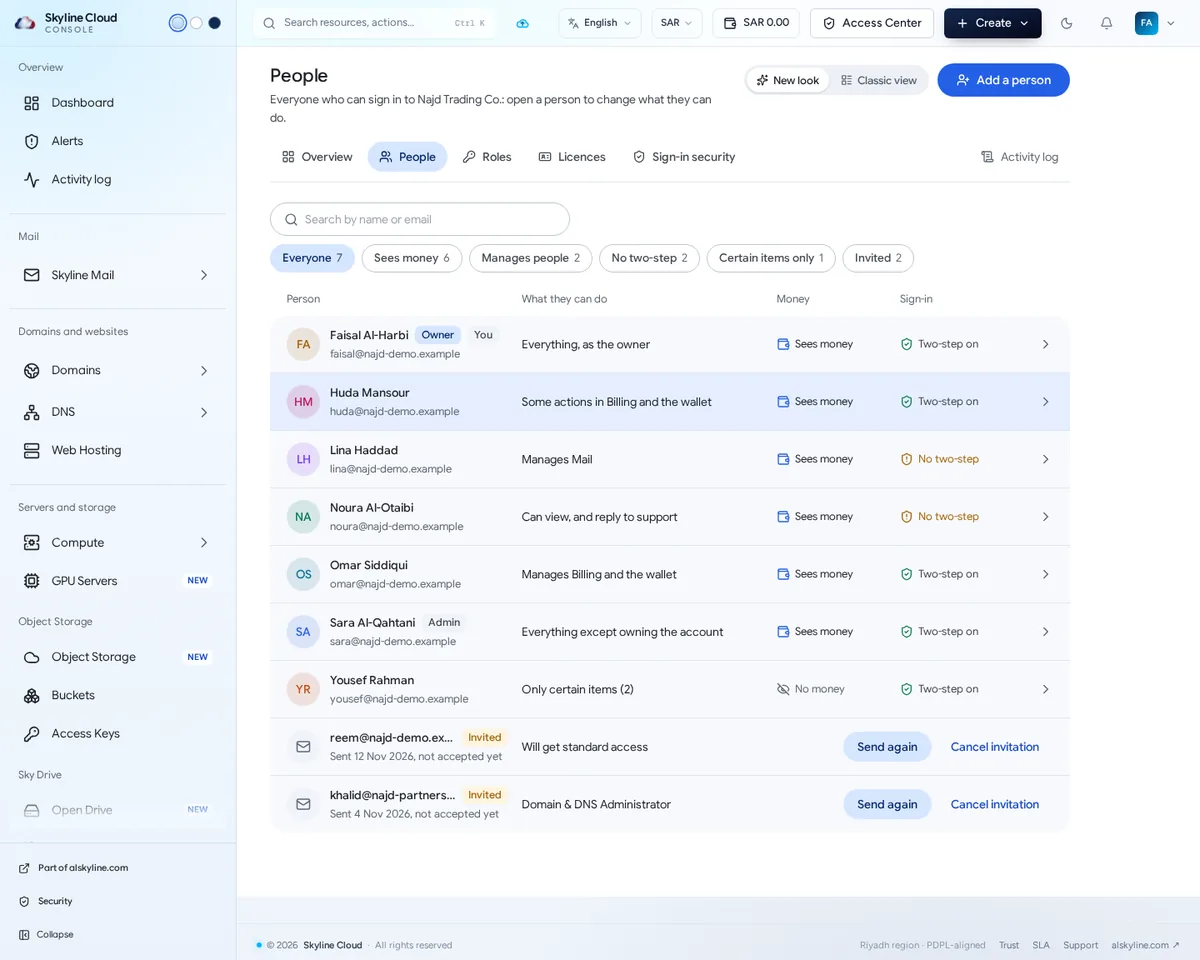
- An account belongs to a team (your organisation). People are invited to the team and given roles that say what each may do.
- Services are prepaid: money is added to the wallet in Saudi riyals by card or bank transfer, and services are charged to it. Tax invoices show 15% VAT.
- Opening an account is free and needs no card. You pay when you add a service.
What are the parts of Skyline Cloud?
Sixteen parts, each with its own place in the console menu. The link in each row opens the page to read first.
| Part | What it is | Where in the console |
|---|---|---|
| Skyline Mail | Business email on your own domain: mailboxes, shared mailboxes, aliases, lists, policies, spam filter, mail log. | Mail → Skyline Mail |
| Mail apps | Skyline Mail for iPhone and iPad, Skyline Mail for Windows; mailboxes also work in Outlook. | App Store, download page |
| Domains | Register a domain name (including .sa) or connect one you own. | Domains and websites → Domains |
| DNS | The records that point a name at a website, a server or mail, on name servers in the Kingdom. | Domains and websites → DNS |
| Web hosting | Managed hosting for websites with the S Panel control panel and a certificate that renews itself. | Domains and websites → Web Hosting |
| Servers and GPU | Virtual servers with root access, in Riyadh or abroad, and GPU servers by the hour. | Servers and storage → Cloud Servers, GPU Servers |
| Object storage | S3-compatible buckets for applications. | Servers and storage → Object Storage |
| Skyline Drive | File storage and sync for people, with a nightly copy to restore from. | Servers and storage → Open Drive |
| Backup | Scheduled backup of computers through an agent, with restore. | Servers and storage → Backup |
| Team and access | The people who may sign in, their roles, licences and sign-in security. | Access and account → Team and access |
| Billing and wallet | A prepaid wallet in Saudi riyals, subscriptions, tax invoices and spend reports. | Access and account → Billing, Wallet |
| Alerts | One list of what needs attention across all products, with the next step for each. | Overview → Alerts |
| Activity log | A record of who did what in the account, and when. | Overview → Activity log |
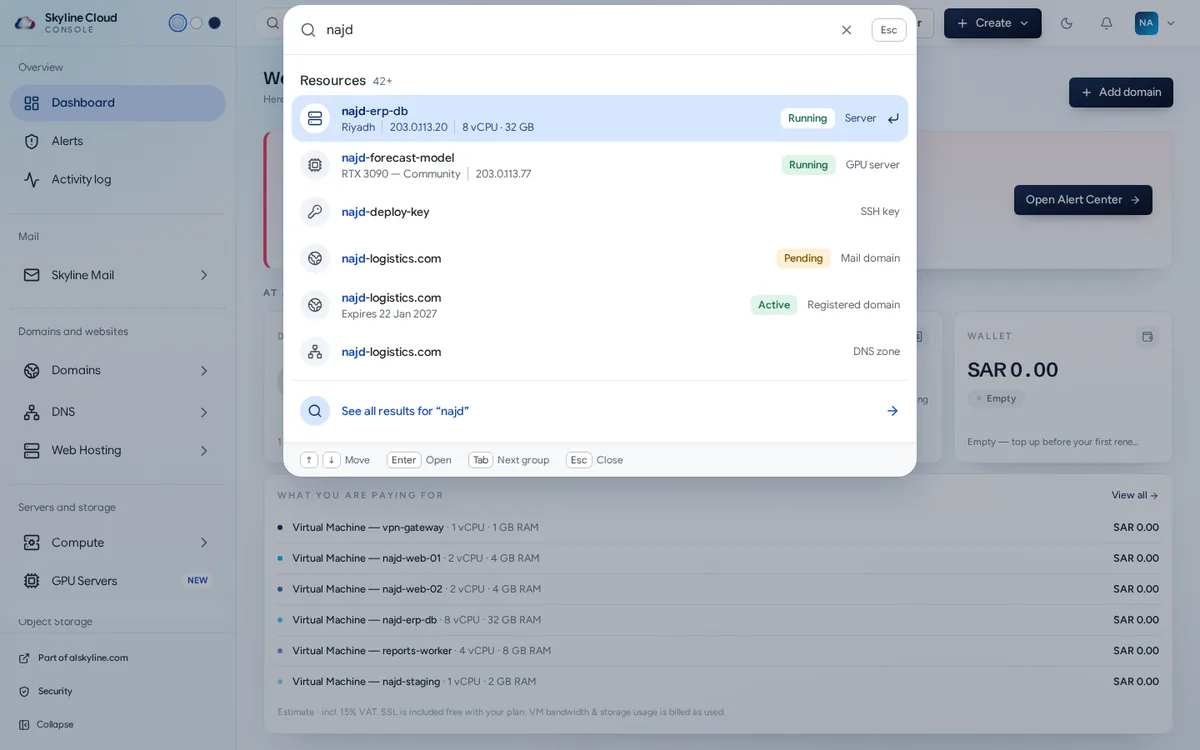
| Search | Finds any resource, page, action or help article; opens with Ctrl K. | Top bar |
| Settings | Your profile, password, language, notifications and API tokens. | Settings |
| Support | Tickets answered by Skyline's team in Arabic and English. | Settings → Support |
How do the parts fit together?
- One team, many people. The owner invites colleagues under Team and access and gives each a role, for example Mail Administrator or Billing Administrator. A role opens only its own areas, and money can be kept from people who do not need to see it.
- One wallet. Mailboxes, hosting plans, servers, domains and storage are all charged to the same prepaid wallet, and every charge has an invoice under Billing.
- A domain ties services together. A name is registered or connected under Domains, its records live in DNS, and those records point the name at web hosting or a server and deliver its mail to Skyline Mail.
- Three tools watch everything. Alerts lists what needs attention in any product and what to do next. The activity log records who changed what. Search finds any server, mailbox, domain, invoice, page or help article.
- Support is part of the console. A ticket opened under Support is answered by Skyline's team by email and in the ticket, in Arabic or English.
Where is my data hosted?
| Service | Where it runs |
|---|---|
| Skyline Mail mailboxes | Riyadh, Saudi Arabia. Every mailbox is stored inside the Kingdom. |
| Web hosting | Riyadh, in Oracle Cloud Infrastructure's Riyadh region. |
| "Riyadh" cloud server plans | Riyadh, in Oracle Cloud Infrastructure's Riyadh region. |
| Other cloud server plans and GPU servers | Outside the Kingdom. The console marks each region as In-Kingdom or Outside the Kingdom before you pay. |
| DNS | Name servers inside the Kingdom. |
| Object storage | The Riyadh region; objects do not leave the Kingdom. |
Skyline Cloud describes its controls as aligned with the Saudi Personal Data Protection Law (PDPL) and National Cybersecurity Authority (NCA) requirements. Aligned is not the same as certified, and no certificate is claimed. Details are on the trust page.
How do I start with Skyline Cloud?
- Create an account. Go to cloud.alskyline.com/register. It is free and needs no card.
- Add your company details. Enter the legal name and VAT number so that invoices are correct. How to add your company and tax details in Skyline Cloud
- Top up the wallet. By card or Saudi bank transfer. How to top up your Skyline Cloud wallet
- Bring your domain. Register a new name or connect one you own. How to connect a domain you already own to Skyline Cloud
- Add the service you need. Create mailboxes, choose a hosting plan or create a server. How to create a mailbox in Skyline Mail
- Invite your team. Give each person the role that fits. How to invite a person to Skyline Cloud and choose what they can do
All guides
One task per page. Each guide starts with the short answer, then the numbered steps with the exact button names, what to do if something goes wrong, and frequent questions.
Skyline Mail
- Skyline Mail: what it is, what it does and where it runs Product facts
Plain facts about Skyline Mail: business email on your own domain, stored in Riyadh, with Exchange, IMAP, webmail, spam filtering and Arabic support. - How to create a mailbox in Skyline Mail
Create a business mailbox in the Skyline Cloud console: pick the domain, the mailbox type, a licence and a password, then sign in at mail.alskyline.com. - How to add your domain to Skyline Mail and pass the MX, SPF, DKIM and DMARC checks
Add your own domain to Skyline Mail in four steps: enter it, prove ownership with one TXT record, publish MX, SPF, DKIM and DMARC, then create a mailbox. - How to set mail policies for every mailbox in Skyline Mail
Set one rule for every mailbox in Skyline Mail: apply the Standard or Strict preset, change a single policy, add an exception and read the history. - How to require two-step sign-in for Skyline Mail webmail
Make webmail ask every mailbox for a code from an authenticator app: set the policy, choose a start date, remind people and reset a lost phone. - How to set the spam filter level and use the Junk folder in Skyline Mail
Choose how strict the Skyline Mail spam filter is for your organisation or for one mailbox, and see what was refused or sent to Junk. - How to track a message with the Skyline Mail log
Find any message to or from your mailboxes in the Skyline Mail log, read whether it was delivered, refused or is still waiting, and export the list as CSV.
Mail apps and Outlook
- Skyline Mail apps for iPhone and Windows: what they are and what they do Product facts
Plain facts about Skyline's own mail apps: Skyline Mail for iPhone and iPad and Skyline Mail for Windows. What each does, what it needs, where to get it. - How to set up Skyline Mail on an iPhone or iPad
Two ways to get your Skyline Mail mailbox on an iPhone or iPad: the Skyline Mail app from the App Store, or Apple Mail with a ready-made profile. - How to add a Skyline Mail mailbox to Outlook
Add your Skyline Mail mailbox to Outlook for Windows as an Exchange account with just the address and password. What differs in the new Outlook and on Mac. - How to install and sign in to Skyline Mail for Windows
Download Skyline Mail for Windows, add your Skyline mailbox with your email address, and use mail, calendar, people and to-do in one Outlook-style app.
Team and access
- How to invite a person to Skyline Cloud and choose what they can do
Add a colleague, accountant or developer to your Skyline Cloud account in four steps: who, what they can do, a licence, review. Then send the invitation. - Skyline Cloud roles explained: what each role can do
What each ready-made role in Skyline Cloud can do, from Organization Owner to Member, how to give a role to a person, and how to create your own role. - How to remove a person from your Skyline Cloud account
Take away a person's access to your Skyline Cloud account when they leave: what they lose at once, what stays in the account, and what to check after. - How to require two-step sign-in for everyone in your Skyline Cloud team
Make two-step sign-in compulsory for everyone who signs in to your Skyline Cloud account: required now or from a date, allowed methods, trusted networks.
Alerts
- How to read and act on alerts in the Skyline Cloud Alert Center
Use the Alert Center in Skyline Cloud to see what needs attention, open an alert for the next steps, then acknowledge, snooze or resolve it. - How to set up alert emails in Skyline Cloud
Decide who is emailed about which alerts in Skyline Cloud: add a rule, choose severity, products and people, pick the language and switch it on.
Activity log
- How to read and export the activity log in Skyline Cloud
See who did what in your Skyline Cloud account and when, filter by person, area, kind, result and period, open an entry for details and export CSV.
Search
- How to find anything in Skyline Cloud with search
Press Ctrl K in the Skyline Cloud console to find a server, mailbox, domain, invoice, page, action or help article, and filter the results by product.
Domains and DNS
- Domains and DNS in Skyline Cloud: what they are and what they do Product facts
Plain facts about Domains and DNS in Skyline Cloud: register names including .sa, connect a domain you own, and manage DNS records hosted in the Kingdom. - How to register a domain name in Skyline Cloud
Search for a domain in Skyline Cloud, compare endings and prices, add it to the cart, upload the documents a Saudi domain needs, and pay. - How to connect a domain you already own to Skyline Cloud
Add a domain registered elsewhere to Skyline Cloud: keep your DNS where it is and add one record, or move DNS to Skyline with your mail records copied. - How to edit DNS records in Skyline Cloud and point a name at a website, a server or mail
Open a DNS zone in Skyline Cloud and add or change records: point the domain at your hosting or a server, set up email records, or add a custom record.
Web hosting
- Skyline Cloud web hosting: what it is, what it does and where it runs Product facts
Plain facts about Skyline Cloud web hosting: managed hosting in Riyadh with the S Panel control panel, a certificate that renews itself, and SAR billing.
Servers and GPU
- Skyline Cloud servers and GPU servers: what they are and where they run Product facts
Plain facts about Skyline Cloud servers and GPU servers: virtual servers with root access in Riyadh or abroad, and GPU servers by the hour. - How to create a cloud server in Skyline Cloud
Create a cloud server in Skyline Cloud in five choices: region, operating system, size, how you log in and a name. Pay from the wallet and connect by SSH.
Object storage, Drive and Backup
- Object storage, Skyline Drive and Backup: which is which in Skyline Cloud Product facts
Plain facts about three storage products in Skyline Cloud: S3-compatible object storage, Skyline Drive for files, and Backup for computers.
Billing and wallet
- How to top up your Skyline Cloud wallet
Add money to your Skyline Cloud wallet by card or by Saudi bank transfer, track a pending top-up, and set auto-pay and a low-balance alert. - How to pay an invoice in Skyline Cloud
Pay an outstanding Skyline Cloud invoice from your wallet balance, top up first if it is short, download the tax invoice, and avoid a suspended service.
Settings
- How to change your Skyline Cloud password
Change the password you use to sign in to the Skyline Cloud console, reset it if you forgot it, and know how it differs from a mailbox password. - How to switch the Skyline Cloud console between Arabic and English
Change the language of the Skyline Cloud console to Arabic or English from the top bar or Settings, and set the time zone and light or dark appearance. - How to add your company and tax details in Skyline Cloud
Enter your legal name, VAT number, Commercial Registration and national address in Skyline Cloud so that your tax invoices carry the right details. - How to create an API token in Skyline Cloud
Create an API token in Skyline Cloud so that a program can use your account: name it, choose what it may do and when it ends, copy it once, revoke it later.
Support
- How to open a support ticket in Skyline Cloud
Open a support ticket from the Skyline Cloud console: choose the category and priority, describe the problem, attach files, and follow the reply.
Frequently asked questions
Is Skyline Cloud hosted in Saudi Arabia?
Skyline Mail, web hosting and the "Riyadh" server plans run in Riyadh, and DNS and object storage are in the Kingdom too. Some server plans and GPU servers run outside the Kingdom; the console marks them clearly.
Is the console available in Arabic?
Yes. The console, webmail and Skyline's mail apps are in Arabic and English, and support answers in both languages.
How do I pay for Skyline Cloud?
From a prepaid wallet in Saudi riyals that you top up by card or Saudi bank transfer. Tax invoices in SAR with 15% VAT are listed under Billing.
Is there a mobile app?
Skyline Mail has an app for iPhone and iPad on the App Store, listed as "Skyline Cloud Mail", and a desktop app for Windows. An Android app is not on Google Play yet; on Android a mailbox is added to the phone's mail app or to Outlook.
How do I get help?
Open a ticket under Support in the console, or call or message +966 50 993 9334. Support hours are Saturday to Thursday, 08:00 to 17:00 Saudi time.