Open Team and access → Sign-in security and select Change next to Two-step sign-in. Choose Required now or Required from a date, set the days people get to set it up, and save. Everyone then confirms each sign-in with a second step, such as an authenticator app, a passkey or a recovery code. Only the account owner can change these settings.
What you need
- You must be the owner of the account. Everyone else can view the page.
- A few minutes to tell your team before the start date.
How do I make two-step sign-in compulsory?
Open Sign-in security. In the console open Team and access and go to the Sign-in security tab. It shows four settings (Two-step sign-in, Ways to do the second step, Trusted networks, Password rules) and, below, Who signs in without two-step.
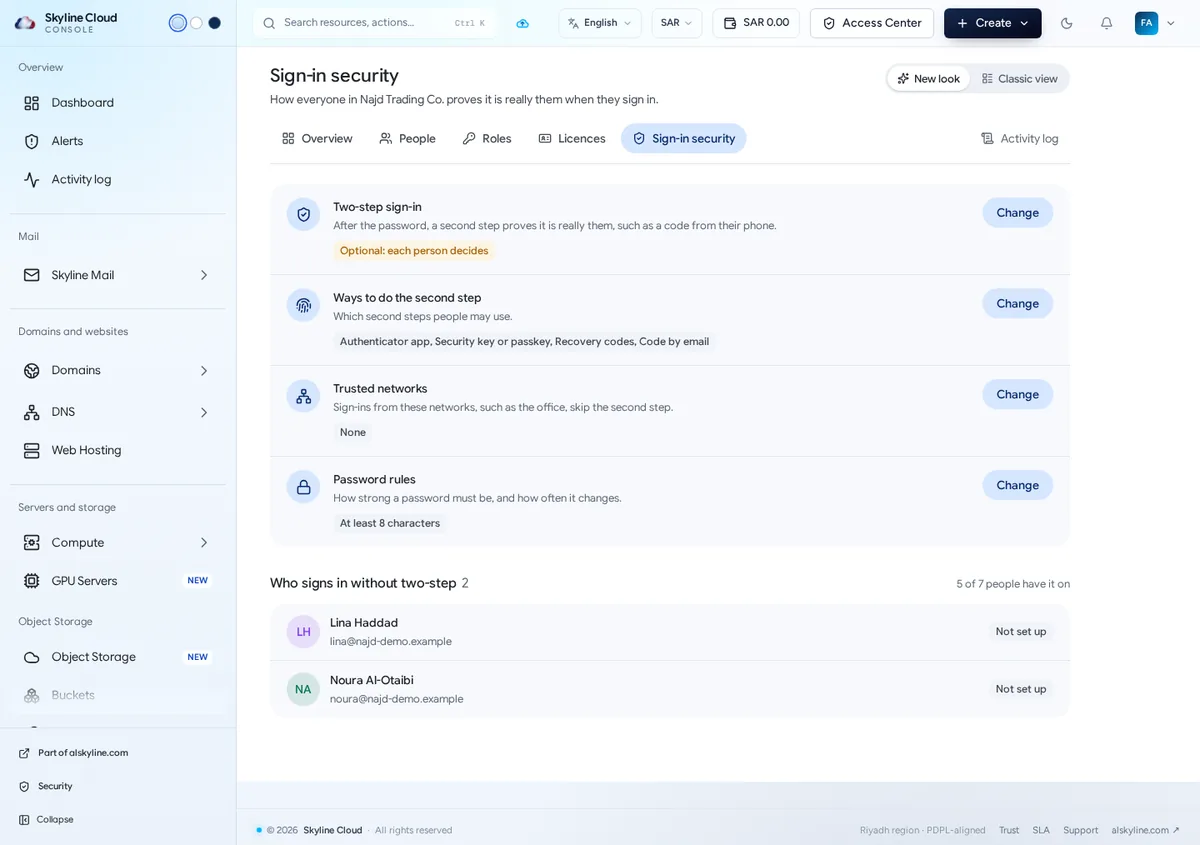
Change the two-step setting. Select Change next to Two-step sign-in and choose Required now (everyone sets it up at their next sign-in, after the days you allow) or Required from a date and a Start date, which gives everyone notice first. Optional leaves it to each person.
Set the days of grace. Fill in Days people here now get to set it up (0 means straight away) and Days a new person gets after joining (0 means at their first sign-in). The dialog tells you how many people have not set it up yet.
Save. Select Save changes. The setting now reads Required for everyone or Required from the date you chose.
Choose the allowed second steps. Under Ways to do the second step select Change. The authenticator app is always on; you decide whether people may also use a security key or passkey, recovery codes and a code by email.
Follow up. The list Who signs in without two-step shows who has not set it up, and the People tab has a No two-step filter. After the days of grace, people who have not set it up cannot use the account until they do.
Which second steps are there?
| Way | What it is |
|---|---|
| Authenticator app | Six-digit codes from an app. Always on: everyone needs at least one way. |
| Security key or passkey | A hardware key, or the fingerprint or face sign-in of a device. The strongest way. |
| Recovery codes | One-time backup codes, for when the phone is not at hand. |
| Code by email | A code sent to the person's email address. |
What are trusted networks and password rules?
Trusted networks: sign-ins from these networks, such as the office, skip the second step. Add the office network address with care, and only if the office network itself is well protected.
Password rules: the shortest password allowed (8 is the lowest; 12 or more is better), what a password must contain, whether passwords found in known leaks are refused, whether the last passwords may be used again, and after how many days a new one is asked. New rules apply the next time someone sets a password.
If something goes wrong
| What you see | What to do |
|---|---|
| Only the owner of the account can change these settings. | Ask the owner to make the change, or to hand the task to you by doing it together. |
| A person is locked out after the days of grace | They set up the second step at sign-in and get in again. If they lost their phone, they can use a recovery code, or an administrator who helps people sign in can reset their two-step sign-in from their page. |
| People in the office are not asked for a code | The office is on the list of trusted networks. Remove it there if you want the second step everywhere. |
Frequently asked questions
Is this the same as two-step sign-in for mailboxes?
No. This page covers people who sign in to the Skyline Cloud console. Two-step sign-in for webmail is a mail policy, set under Skyline Mail → Policies.
What happens if I switch it back to Optional?
People who already use two-step sign-in keep it. New people are no longer asked to set it up.
Does it apply to new people automatically?
Yes. A new person gets the number of days you set under "Days a new person gets after joining"; 0 means they set it up at their first sign-in.
Related guides
- How to require two-step sign-in for Skyline Mail webmail
- How to invite a person to Skyline Cloud and choose what they can do
- Skyline Cloud roles explained: what each role can do
- How to read and export the activity log in Skyline Cloud
- How Skyline Cloud works: all guides
Ready to do it? Sign in to Skyline Cloud. No account yet? Create your account; opening one is free and needs no card.
Comments
0 total · 0 threads