Open Settings → Company and tax details. The page shows what is printed on every invoice, in sections: Company, Prices and currency, Tax details, Another ID and Billing address. Select Change on a section, fill in the panel and select Save. With a VAT number your company receives standard tax invoices; without one, simplified invoices. Only the owner of the company account can change these details.
What you need
- You must be the owner of the company account to change the details; others can look.
- Your VAT registration certificate and Commercial Registration, to copy the numbers and the legal name exactly.
- Your Saudi national address: street, building number, district, city and postal code.
How do I enter my company and tax details?
Open the page. In the console open Settings → Company and tax details. The link Tax profile (ZATCA) on the Billing page opens the same place.
Company. Select Change and enter the Company name, Phone and Company size. Everyone in your team sees the new name.
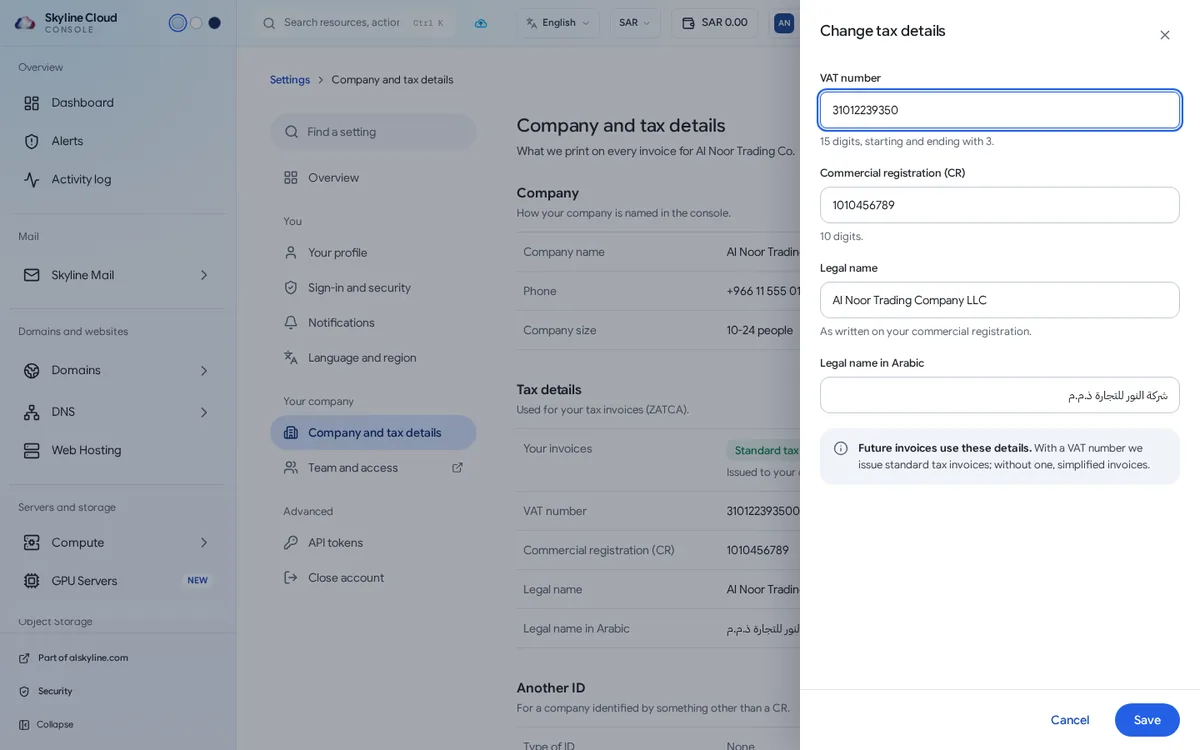
Tax details. Select Change and enter the VAT number (15 digits, starting and ending with 3), the Commercial registration (CR) (10 digits), the Legal name as written on your commercial registration and the Legal name in Arabic. Select Save. Future invoices use these details.
Another ID, if you have no CR. Under Another ID choose the Type of ID, such as a tax identification number, a municipal or labour licence, an Iqama or a passport, and enter the ID number.
Billing address. Select Change and enter Street, Building number (4 digits), District, City, Postal code (5 digits) and Country. This is your national address as printed on invoices.
Check the invoice type. In Tax details, Your invoices now shows Standard tax invoices (issued to your company with your VAT number) or Simplified invoices.
What is the difference with and without a VAT number?
| With a VAT number | Without | |
|---|---|---|
| Invoice type | Standard tax invoices, issued to your company with your VAT number | Simplified invoices |
| When to choose | Your business is VAT-registered and needs the invoice for its records | Individuals and businesses that are not VAT-registered |
Skyline Cloud invoices are in Saudi riyals and show 15% VAT. Prices for each product are on the live price pages.
What is Prices and currency?
This section shows the Billing country whose prices your company pays, and the Currency. A change applies to new orders.
If something goes wrong
| What you see | What to do |
|---|---|
| You can look, not change. | Only the owner of the company account can change these details. Ask the owner to enter them. |
| The VAT number is refused | It must have exactly 15 digits and start and end with 3. Remove spaces and copy it from the certificate. |
| The building number or postal code is refused | Use the 4-digit building number and the 5-digit postal code of your national address. |
| An invoice was issued before you saved the details | New details apply to future invoices. If you need an earlier invoice corrected, open a support ticket and quote the invoice number. |
Frequently asked questions
Do I have to fill this in?
No, but a VAT-registered business should, so that it receives standard tax invoices with its VAT number and legal name.
Where do I find my invoices?
Under Billing → Invoices, where each one can be downloaded.
Does changing the company name change my invoices?
The company name is how your company appears in the console. Invoices use the legal name entered under Tax details.
Related guides
- How to pay an invoice in Skyline Cloud
- How to top up your Skyline Cloud wallet
- Skyline Cloud roles explained: what each role can do
- Skyline Cloud prices
- How Skyline Cloud works: all guides
Ready to do it? Sign in to Skyline Cloud. No account yet? Create your account; opening one is free and needs no card.
Comments
0 total · 0 threads