A role says what a person may do in your Skyline Cloud account. There are 13 ready-made roles, from Organization Owner (everything) to Member (view the account and reply to support tickets); most administrator roles manage one area and can view the rest. Give roles on a person's page under Team and access → People, or copy a ready-made role to make your own.
What you need
- To give or take away roles: the owner, an administrator, or a role that manages people.
- To create or edit your own roles: a role that may manage roles.
What can each ready-made role do?
| Role | What it can do |
|---|---|
| Organization Owner | Everything in this account, including handing it over or closing it. |
| Global Administrator | Manages everything except owning the account: people, roles, billing, mail, domains, servers and security. |
| Global Reader | Can view everything and change nothing. |
| User Administrator | Manages people: invitations, roles, groups, two-step sign-in and password resets. Can view the rest. |
| Helpdesk Administrator | Helps people sign in: resets passwords and two-step sign-in. Can view the rest. |
| Security Administrator | Manages the security policy, the IP allow-list and filtered mail. Can view the rest. |
| Billing Administrator | Manages invoices, payments, the wallet and refunds. Can view the rest. |
| Mail Administrator | Manages mailboxes, aliases, lists, signatures, mail rules and filtered mail. Can view the rest. |
| Domain & DNS Administrator | Registers and manages domains, DNS records, email authentication and SSL. Can view the rest. |
| Hosting Administrator | Manages web hosting and websites. Can view the rest. |
| Compute Administrator | Creates and manages cloud servers. Can view the rest. |
| Support Agent | Answers support tickets. Can view the rest. |
| Member | Can view the account and reply to support tickets. |
Ready-made roles are fixed. The wording above is the description the console shows next to each role.
How do I give a role to a person?
Open the person. Go to Team and access → People and select the person. Their page lists each area (Domains, DNS, Mail, Billing and the wallet, People and roles, Sign-in security, Support tickets and more) with Can manage or Can view only.
Give the role. Under Roles select Give role, choose the role and confirm. The change takes effect at once and is written to the activity log.
Take a role away. On the same page select Remove next to the role. The person keeps whatever their other roles allow.
Browse all roles. The Roles tab lists Your own roles and the Ready-made roles, with the number of people who hold each one. Filter with All roles, In use and Your own.
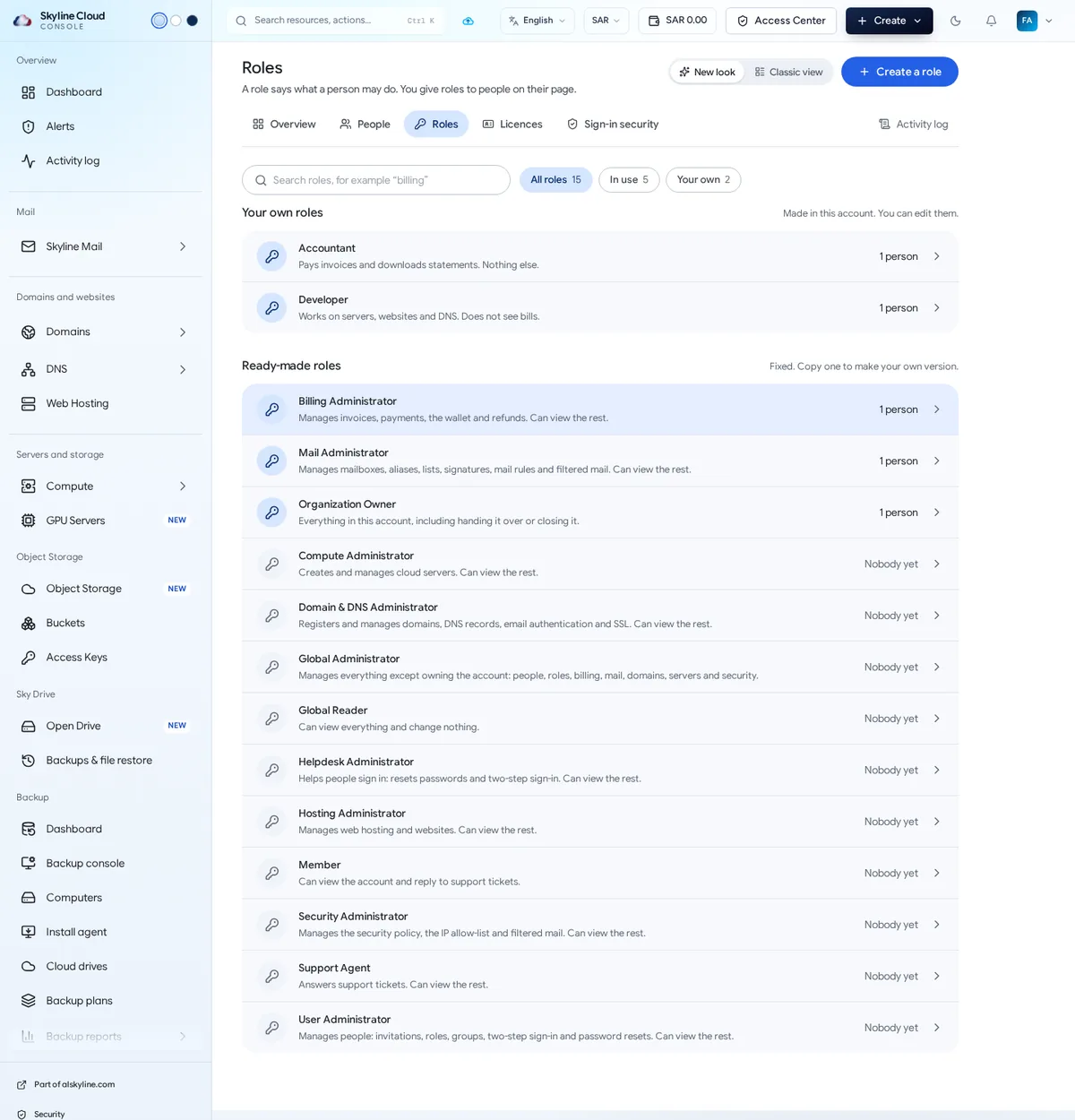
Create your own role. Select Create a role, or open a ready-made role and choose Make a copy. Name it, choose what it may view and manage in each area, and save. Your own roles can be edited later; ready-made ones cannot.
How do roles add up?
A person can hold several roles; they can do whatever any of their roles allows. Start small: give View only or one area, and add more when the need is real. Money is treated as its own area: the People list shows for each person whether they see money, so you can keep invoices and the wallet away from people who only work on servers or websites.
If something goes wrong
| What you see | What to do |
|---|---|
| Give role is missing | Your own role does not manage people, or the role you want goes beyond your own access. Ask the owner. |
| A person still cannot open a page after getting a role | Ask them to reload the page. If it is still closed, the role covers a different area; check its description in the table above. |
| You cannot edit a role | Ready-made roles are fixed. Use Make a copy and edit the copy. |
Frequently asked questions
What is the difference between Owner and Global Administrator?
The Organization Owner can do everything, including handing the account over or closing it. A Global Administrator manages everything except owning the account.
Which role should an accountant get?
Billing Administrator manages invoices, payments, the wallet and refunds and can view the rest. If they should see nothing but invoices and statements, make your own narrower role.
Which role is safest for an auditor?
Global Reader: it can view everything and change nothing.
Are role changes recorded?
Yes. Giving and taking away roles appears in the activity log under People and roles, and role changes are kept without a time limit.
Related guides
- How to invite a person to Skyline Cloud and choose what they can do
- How to remove a person from your Skyline Cloud account
- How to require two-step sign-in for everyone in your Skyline Cloud team
- How to read and export the activity log in Skyline Cloud
- How Skyline Cloud works: all guides
Ready to do it? Sign in to Skyline Cloud. No account yet? Create your account; opening one is free and needs no card.
Comments
0 total · 0 threads